From your first login to your first audit-ready report
Connect
AlignSure works with Microsoft 365 Business and Enterprise plans. Your team signs in with the Microsoft account they already have. If your plan includes Conditional Access and MFA policies, AlignSure respects them. Nothing to install and nothing on-premises.
- Works with Microsoft 365 Business and Enterprise plans
- We connect your Microsoft tenant during onboarding
- Nothing to install on anyone's computer
- Your existing security policies carry through unchanged
Configure
Tell us what you're responsible for: HIPAA, OSHA, workers' comp, ADA, Certificate of Insurance. Pick the ones that keep you up at night. Assign the people on your team who review and approve, and AlignSure maps the deadlines and evidence requirements from there.
- Pre-built templates so you're not starting from scratch
- Roles map to your org chart, not ours
- Each framework comes with its own evidence requirements and collection schedule
- Reporting cadences and escalation rules are yours to set
Validate
Upload the documents you already have. COIs, BAAs, job descriptions, incident reports. The AI flags what's missing, scores how strong the evidence is, and every review gets tied to the person who signed off. No anonymous approvals, no unattributed changes.
- Handles COIs, BAAs, SOPs, FROI reports, and policy documents
- Each upload receives a Compliance Confidence Score
- Reviewers attest as authenticated users
- The full audit trail is time-stamped
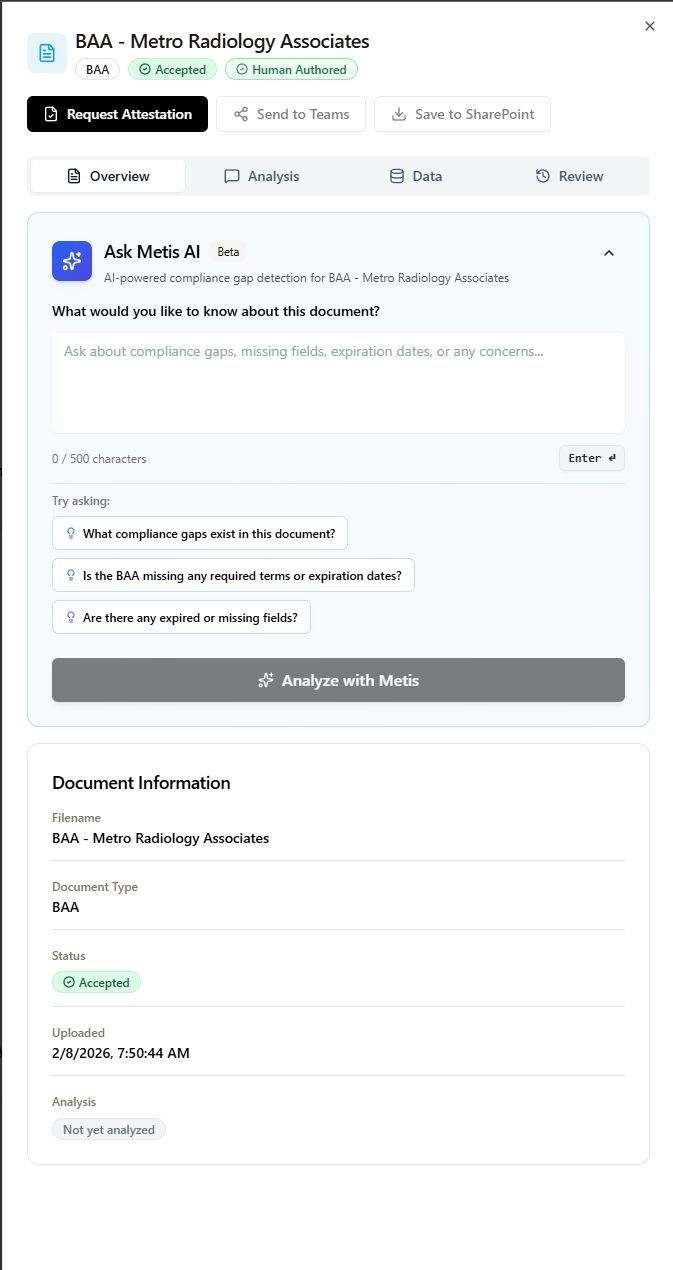
AI-powered compliance gap detection with human reviewer attestation.
Report
Generate the evidence package your underwriter actually wants. Pull up the executive dashboard that shows Cost of Health and Cost of Risk in terms your CFO understands.
- One-click evidence packages structured for underwriter review
- Audit trails filterable by framework, date range, or reviewer
- Executive dashboards that translate compliance activity into financial impact
- Share a live compliance posture view with any stakeholder
What makes AlignSure different
Four capabilities set AlignSure apart. Each shows up in the evidence your auditors and underwriters actually receive.
Identity-bound
Every action is tied to an authenticated user. No anonymous workflows. No shared accounts. When an auditor asks who reviewed a document and when, the answer is already in the system.
Underwriter-ready
Most compliance tools produce reports for internal teams. AlignSure produces evidence packages built for the people who actually make decisions: auditors, underwriters, carriers, and regulators.
Microsoft-native
Your team signs in with the Microsoft account they already use for work. No new password to remember.
Multi-framework
HIPAA, OSHA, ADA, Workers' Comp, and COI workflows all run from one system. No duplicate data entry across separate tools.
See AlignSure configured for your organization
Request a demo and our team will walk you through each step with your specific compliance requirements.